Measure an outside wall with endpoint snaps
Open the practice plan above, or use Open a DXF in the editor to choose your own file. Work on the Model tab. In the practice drawing, locate the lower edge of the larger rectangle. It is the outside face of the wall.
Click the command line at the bottom of the editor. Enter DIST, then type END and press Enter at the first point prompt. Move over the lower-left outside corner and click when the square endpoint marker appears. At the second point prompt, enter END again and pick the lower-right outside corner.
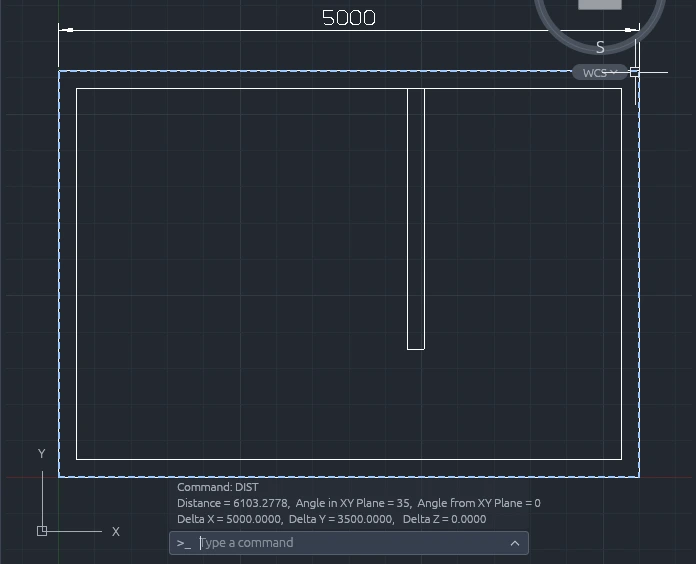
Read the Distance result above the command input. The practice edge is 5,000 mm, with a Delta X of 5,000 and a Delta Y of 0.
Read the diagonal and the X and Y offsets
Measure from the lower-left outside corner to the upper-right outside corner. For a repeatable check, enter the following lines one at a time and press Enter after each line. The # prefix tells the editor to read each X,Y pair from the drawing origin.
The diagonal is about 6,103.28 mm. Delta X is 5,000 mm and Delta Y is 3,500 mm. Read the absolute values of Delta X and Delta Y for the horizontal and vertical spans in the plane of the drawing. Reversing the points changes the signs of the offsets while the distance stays the same.
DIST
#0,0
#5000,3500
Check which geometry you snapped to
Zoom in before choosing corners near a dimension line or a second wall edge. END applies to one point, so enter it at each point prompt. For example, the inner corners along the bottom of the sample are at 150,150 and 4850,150. That distance is 4,700 mm. The 300 mm difference from the outer width is the thickness of two 150 mm walls.
If you need a dimension that stays on the drawing, place it with a dimension command after checking the endpoints. For the perimeter or floor area inside a boundary, use AREA.
Confirm the DXF units before using the result
DIST reports drawing units. The room sample uses millimeters, so 5,000 corresponds to 5 meters. On a file with unclear units, pick a known edge and confirm its intended size with the drawing author before converting the result.
If two known lengths both differ by the same factor, check the DXF import units. For model dimensions, measure in the Model tab. A plotted sheet can have its own scale.