STEP to STL converter
Turn a STEP or STP model into a binary STL for your slicer. Inspect the 3D mesh and check its dimensions before you download.
Files stay on your device
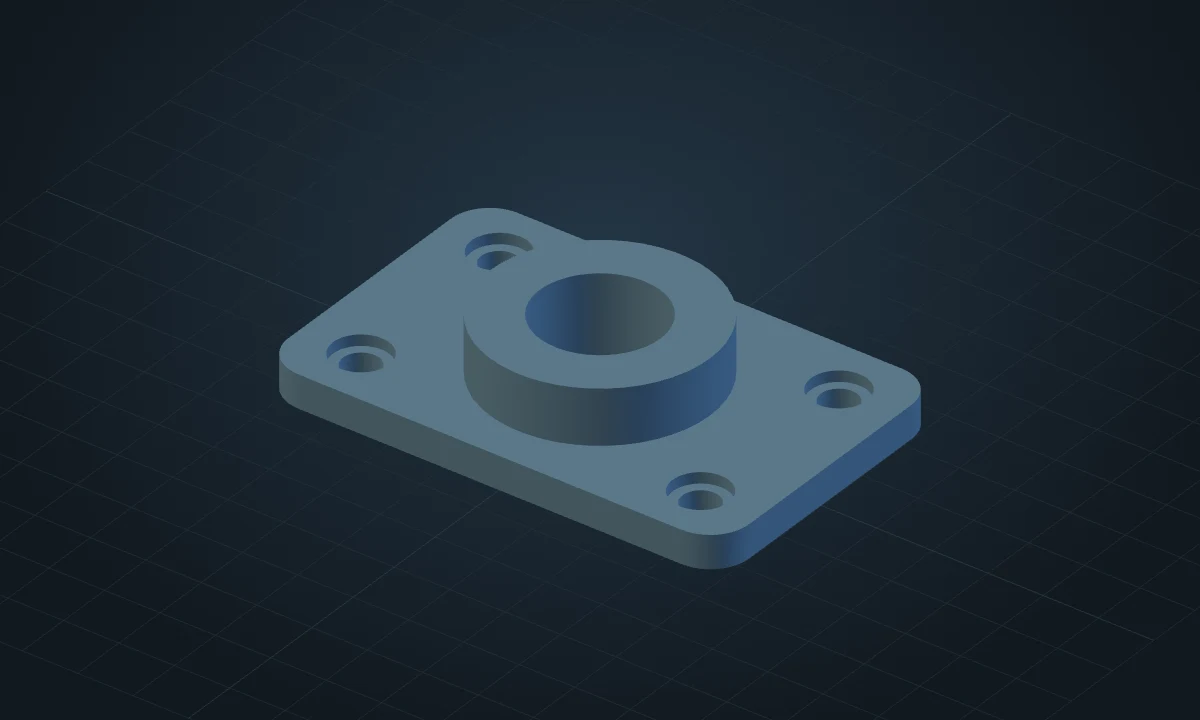
Your STL is ready to download. The 3D preview is unavailable in this browser.
- Triangles
- Bounds (X × Y × Z)
- STL size
How to convert STEP to STL
Open a STEP file
Choose a .step or .stp file from your device, or load the flange plate sample to try the converter first.
Inspect the mesh
Start with Standard quality and millimeters. Rotate the preview and compare the X, Y and Z dimensions with a known size. Toggle Wireframe to see how the curves are divided into triangles.
Download the STL
Save the binary STL and open it in your slicer. Check the size and run a layer preview to inspect thin walls, holes and any separate bodies.
Choose mesh quality for curved parts
Chord tolerance controls how closely triangles follow a curved surface. A smaller angle also subdivides sharp turns more finely. Use Fine if a bore or fillet looks faceted in Standard. Finer meshes typically contain more triangles and take longer to generate and slice.
| Mesh quality | Chord tolerance | Angle |
|---|---|---|
| Draft | 0.3 mm | 30° |
| Standard | 0.08 mm | 16° |
| Fine | 0.02 mm | 8° |
Compare a real STEP and STL
This flange plate is 84 × 54 × 16 mm. The Standard STL has 2,044 triangles. Zoom into the raised collar and counterbores to see how the mesh follows the curves.
What changes when you convert STEP to STL?
STEP and STP are extensions used for CAD models with surfaces, solids and assemblies. An STL stores the surface as triangles. Its geometry approximates details such as cylinders and fillets. Keep the original STEP when you need to edit the solid or measure the underlying curves in CAD.
The converter writes a binary STL. When a STEP file contains multiple bodies, they are included in the same mesh file at their original relative positions. Inspect clearances and intersections in your slicer before printing.
Check the scale before you slice
STL coordinates carry no unit label. Keep millimeters if your slicer reads STL coordinates in millimeters. Choose inches only when the receiving application is set to read inches. A 25.4 mm edge becomes a coordinate span of 1 in an inch-based STL.
If your part appears 25.4 times too small or too large, check the STL import units. Compare a dimension you know on the original model before you print.
Common questions
Can I convert both STEP and STP?
Yes. Choose either extension. The file limit is 40 MiB and conversion runs in your browser.
Does the converter upload my model?
The browser reads your STEP file, creates the mesh and generates the STL on your device. You can use the tool without signing in.
How can I get a smoother STL?
Try Fine quality and zoom in on a curved edge in the preview. The finer setting can increase the STL size.
Can I get one STL per part in an assembly?
This tool creates one STL that includes the assembly meshes. If you need separate files, export each part as its own STEP in your CAD app and convert them individually.